If you already have a Google Docs account, skip to slide 5 in this tutorial by Sam Lam.
Google form tutorial
View more presentations from infomgtaiesec.
If you already have a Google Docs account, skip to slide 5 in this tutorial by Sam Lam.
 Need copyright free photos for your Web 2.0 projects? Use the websites below:
For more information on using photos in Web 2.0 projects or internet based projects, visit Creative Commons.
One of the wonderful things about Glogster is you have the option embedding your Glog into a Blog or a Wiki. But one of the things I ran into when trying to embed my glog into my blog is the size was either too big, or too small. So here’s how you can embed your glog and make it fit!
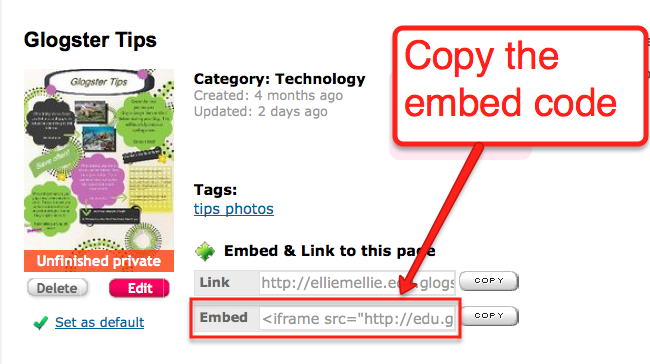
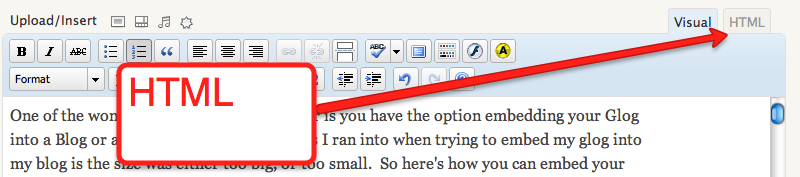
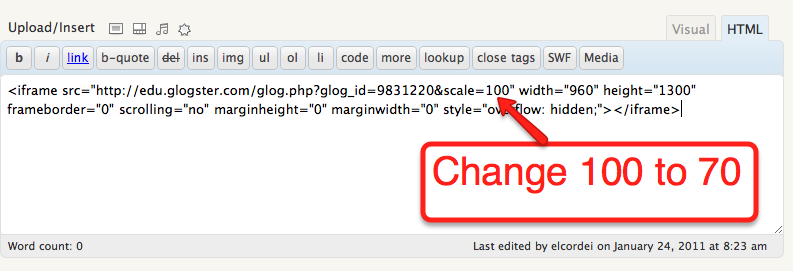
You also have the option of embedding your Glog as you’re saving. If you copy the embed code from the save menu:
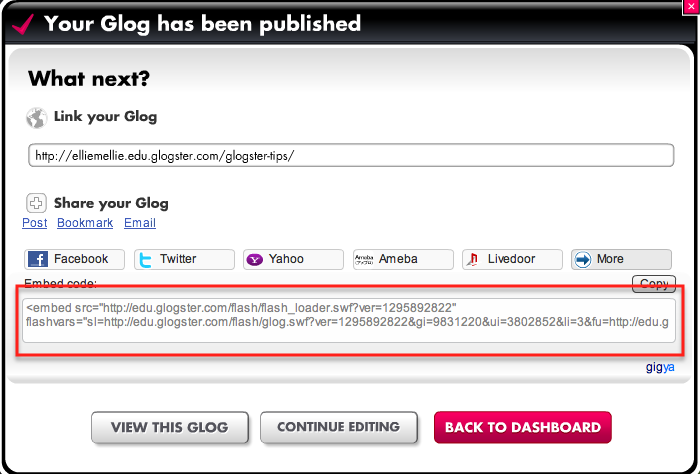
Here’s what your Glog will be scaled to in your Blog:
Click here for a printable version of this tutorial.
Click here for a printable version of this tutorial.
Click here to download a printable version.
This blog post is meant to be used in conjunction with a face-to-face training.
Click here for the Getting Started with iGoogle handout.
https://spreadsheets.google.com/viewform?formkey=dFdjV04yTkdIUkV4bHZmdm4xblJuLWc6MQ
