Google Slides adding a Q&A feature

Cursor_and_Google_Docs_Blog__Talk_with_your_audience—not_at_them—with_Slides_Q_A

Watch the Video of Shree Bose as she uses the new feature for Google Slides.  Normally a second application or back channel is used to capture participants questions & comments, now this is a built in feature.  Canʻt wait for it to go live!!  Read about it here.

Posted in Uncategorized | Leave a comment

g(Math) just got better

dKLFJQAdpqQzXeyok001j_IIxUP5FcSRR5PPJ_cq9Z6gdbncSS76VpfuBcS72vFr2pIA3-d2_w_s220-h140-e365__220×140_Have you struggled with Math symbols in Google Docs?  Have you tried the Google Add-on g(Math)?  Handwriting recognition is coming soon to this helpful Add-on.  Can’t wait to try it!  Read about it here.


Posted in Google, Mathematics | Leave a comment

The Apps Show

Cursor_and_The_APPS_SHOWHave you watched an episode of The Apps Show?   If you love Google tips and tricks, you should!  Check out the list of videos and catch up on what you missed.

Posted in Google, Idea worth sharing | Leave a comment

Project Based Learning ideas for Math

Cursor_and_Math_Project_Ideas__Examples_of_Project-Based_Learning

Cursor_and_Math_Project_Ideas__Examples_of_Project-Based_Learning

Great list for those looking for ideas on how to incorporate more Project Based Learning into their curriculum for all grade levels.  Read it here.

Posted in Great resources | Leave a comment

Increasing student engagement

Cursor_and_4_Practices_for_Increasing_Student_Engagement___EdutopiaGreat ideas were shared by @edutopia about sustaining students focus toward the end of the school year.  Here are a few practices to help student engagement in classrooms.

Posted in Uncategorized | Leave a comment

Need coding ideas for the classroom?

Cursor_and_EdTechTeamCursor_and_EdTechTeam_Coding_Tips_jpg_-_Google_Drive

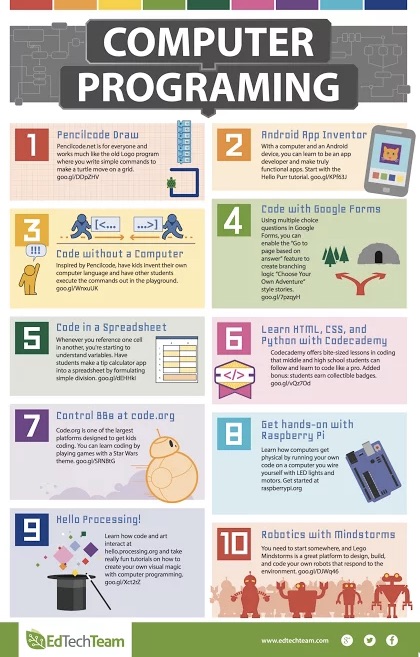
After Hour of Code, the word is getting out about the importance of coding for all students of all ages.  Here are a few ideas on how to get coding started in your classroom.   Enjoy!


Posted in Coding | Leave a comment

How safe are the webtools you are using?

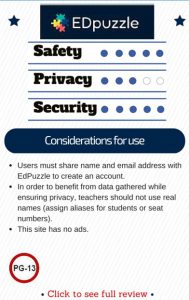
Here is a short directory of web apps and their privacy, safety and security ratings.  Is there somewhere online that I can get a more comprehensive list??  Educational_Technology___Web_Apps_and_their_Privacy__Safety_and_Security_Ratings EdPuzzle_Card

Posted in Great resources, Idea worth sharing | Leave a comment

Google Drawing for Learning

10_Ways_to_Use_Google_Drawings_for_LearningDo you use Google Drawing?  Here are a few ideas on how to use this underutilized Google tool in the classroom.  Enjoy!

Posted in Google | Leave a comment

Save to Google

Not sure what itʻs called yet, but Google Save sounds good for now.  Use Chrome?  Add the Chrome Extension here, when you encounter something online and not sure if a bookmark is the answer, try and Save to Google.

Save_to_Google_-_Chrome_Web_Store

and now go to https://www.google.com/save  to see what you have accumulated.  Try it and see how you like it.

Control_Alt_Achieve__The_Ultimate_Guide_to_Creating_Assessments_with_Google_Forms

Read more about it at Eric Curtsʻ Site found here.

Posted in Google | Leave a comment

Google Drop Box

Allow_Anyone_to_Upload_Files_Directly_to_Your_Drive_-_BetterCloud_Monitor
This video shows you how to upload a file to your Google Drive using this script.
(No google account required to upload to your G-Drive.)

Posted in Google | Leave a comment