test of embeddingGoogle drive video
Reply

Having fun and testing out the Theta 360 camera. Look for more to come!
Setting up for Hana Pono 2015 Kamehameha Schools Ed Tech Conference – Spherical Image – RICOH THETA
ISTE13 is underway! Kamehameha sent 80+ educators and 12 of those are from The elementary division! Saturday had two large preconference sessions, Hacked13 and Mobile Megashare. Both used the unconference style where the participants decided what the topics would be and cycled through the groups every 45 to 60 minutes. Below is a picture of the hacked13 group. It was a great day of learning, sharing and making connections.
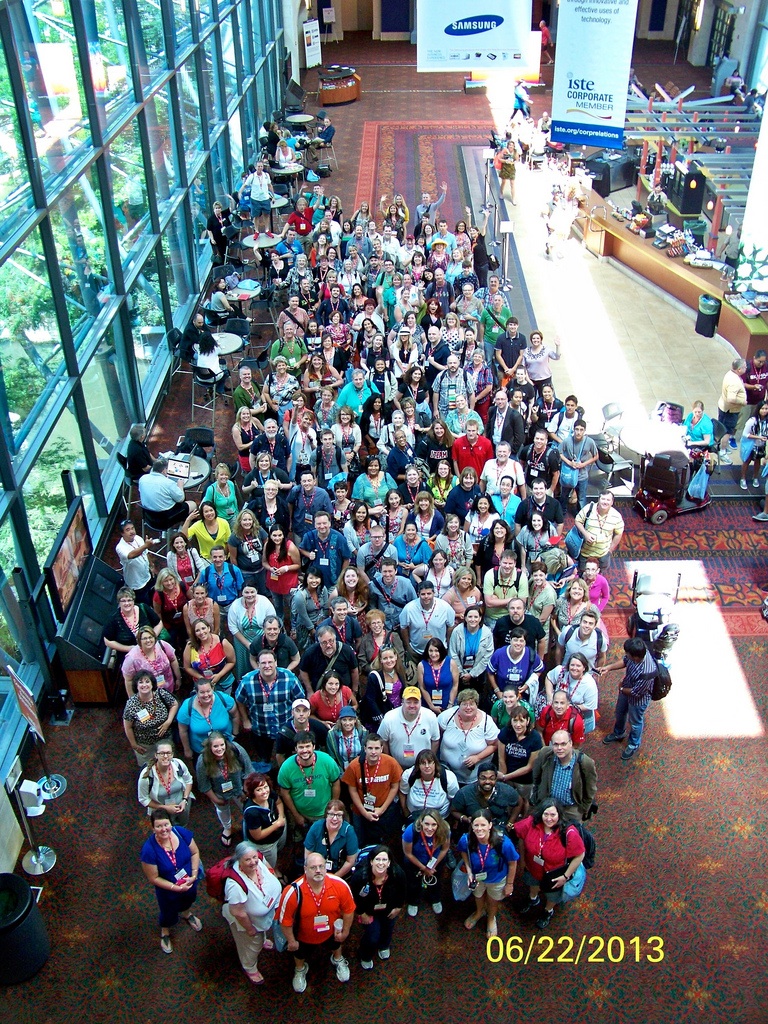
Tonight is the opening Ignite and Keynote sessions and a gathering of attendees from Hawaii and Alaska.
Aloha for now.
For 20+years whenever someone asked what I did it was easy to answer -“I’m a teacher.” No explanation needed. Now my job as an instructional technology specialist often takes a bit more explanation. Maybe this picture can help. Tonight Gordon and I leave for ISTE13 – the annual conference of The International Society for Technology in Education in San Antonio. 11000+ attendees. Iʻm excited yet nervous as Iʻll be presenting sessions with leaders of the edtech coaching world. Iʻm also guiding a group of teachers from KES on their first trip to ISTE as they prepare for our newly approved 1:1 project. I am so very grateful to Kamehameha Schools for proving me an amazing team and environment. I have grown so much these past 5 years. Next post will be from San Antonio. Imua!!

Happy New Year!
One of my goals this year centers around improving my skills as an Instructional Technology Specialist/Tech Coach. All too often schools roll out technology and for whatever reason, provide little to no professional development for integration of the tools into the curriculum. Using a laptop or iPad for personal use is very different than knowing how to use it effectively with students. Thankfully the Kamehameha Schools does acknowledge the need for ongoing training and support. I am incredibly blessed to serve on a wonderful team of instructional technology specialists (coaches) that is always looking for new and innovative ways to support our teachers.
Technology now allows us to expand our resource pool beyond our island boundaries and connect with tech coaches all over the world. This summer and fall I worked with a group of talented tech coaches on the mainland to launch an ISTE SIG for Coaches. ISTE is the International Society for Technology in Education and a SIG is a Special Interest Group. It was formally launched in December 2012. We launched this SIG to be a resource for those that support teachers with integrating technology into their curriculum. We are planning coaching webinars beginning in late January 2013 and will post resources on our wiki.
In June I will be participating in a panel discussion on coaching for educational transformation with yet another group of amazing tech coaches at the 2013 ISTE Convention in San Antonio Texas. I can’t wait to share all that I learn at the conference with my team, my teachers and SIG members.
For those who may ask, “What is a tech coach?” I have a brief article for you to read. As I find new articles related to this topic I’ll post them here. You can follow this strand by clicking on the Coaching link in the menu bar. Check back soon for more information and tech tips and tricks.
Aloha and may 2013 bring joy and peace to us all.
Resources for the workshops on creating e-portfolios using Google Sites and Using Adobe Connect are now posted. Please check the page links above. See you Friday!
Aloha!
We are set to blast off into a Google frontier in less than 2 hours! I’ve added a few pages to this site to support us on our journey. Please take a few moments to look around. Additional information and resources will be added daily.
Look forward to working with you and having fun as we explore teaching with Google docs!
Aloha ladies!
We’re nearly done! Today we will share lesson plans, ask questions, and talk about what we learned.
Please note that today’s class runs from 3-5 pm not 4:30. We are going to attempt to record it using an in-house tool called Adobe Connect.
Today’s agenda
1. Review homework and question & answer session. View glog on Twitter and PLN
2. Sharing of lesson plans
3. Even more cool web 2.0 tools
Storybird
Kerpoof
Makebeliefcomix
GoAnimate4Schools
Edudemic
Topics for today’s class will include:
1. Review of last weeks class and homework. Q& A session (how to embed link & Voki)
2. Developing your PLN Look at Twitter Handbook for Teachers and 31 Interesting Ways to Use Twitter in the Classroom.
–Twitter Classroom 20.com Twitter4Teachers Facebook Wikispaces
Copyright/Fair use
– Creative Commons
Cool Web 2.0 tools of the week Picnik Voicethread and Today’s Meet
Homework
Revised lesson plan template
PLN development – create an account on one of the sites we discussed
Be prepared to share your lesson or reflection of what you have learned for our last class. (May 12th)
Aloha my tech friends,
Thought I’d take a break from the world of educational technology and do a quick survey. Please post your favorite movies of all time. I know for some this is an impossible task – there are just too many to name and how can you pick one over the other, so just put whatever you like in any order. This is not a test and no one will laugh or make fun of your choice (hopefully) 🙂
Here are some of my favorites (in case you couldn’t tell by the posters in my office)
Gone with the Wind (Gable was the King!)
An Affair to Remember (Cary looked gorgeous in a tux!)
Butch Cassidy and the Sundance Kid/The Sting (actually any movie with Paul and/or Robert – need I say more?)
The Sound of Music (no hunky men but the music and scenery were beautiful)
My list could go on and on – I do love movies. What about you?
