
Category Archives: Tools
Use Thinglink to Share Student Work
If youʻre looking for a new & easy way to showcase some of the awesome work your students are doing, check out the new 360 degree photo editor in the Thinglink App. This year, all three divisions have access to the paid application. All you need to do is follow these instructions to sign-up for your KS ThingLink account. It links to your KS Google account, so thereʻs no need to remember information for another account. Once your teacher account is set up, share the invite code with your students & they can develop their own creations.
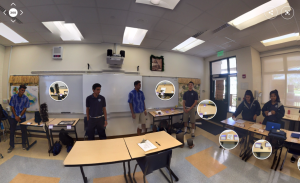
Hereʻs an example of how Kumu Kapulani used the app to showcase a “museum display” activity she did with her students. The entire 360 degree photo was captured using the Google Street View app (very easy to use), then imported into Thinglink. Next close-up shots of the artifacts, along with detailed explanations were added using tags.
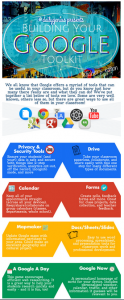 Building Your Google Toolkit
Hereʻs a quick snapshot of some of the tools that Google offers and a glimpse at what they can do of you, in your classroom. Click on the image to view the entire infographic.
Tools discussed: Drive, Forms, Docs, Sheets, Slides, Google Now, Google +, Moderator, Sites, Chromebooks, Cultural Institute.
Using Twitter in Education
 We’ve compiled a short list of useful resources to learn how to use Twitter in Education along with a list of some great groups to follow.
Here’s a quick preview: #ksfaculty, #ksedtech, #ksmes, #cpchat, @kaleoonakoa
Click here to view a full list.